AHE17 - Why Should I Pay?
AHE17 : Android Hacking Events 2017
For this challenge, probably we need install some things into our Android 5.1 device with Genymotion.
For example, an ARM Translator.
https://github.com/m9rco/Genymotion_ARM_Translation
For download the APK
https://team-sik.org/wp-content/uploads/2017/06/WhyShouldIPay.apk_.zip
Install the apk with adb
And decompile the apk with apktool
Load the apk to jadx-gui for see the source code
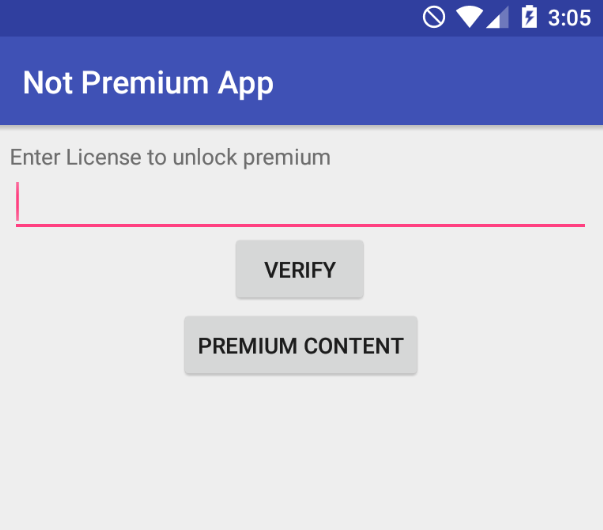
We can see in the first activity that we have the VERIFY button, that give us an error.
And the PREMIUM CONTENT button, that show us an text label that says Not activated.
We can see the AndroidManifest.xml file
<?xml version="1.0" encoding="utf-8"?>
<manifest xmlns:android="http://schemas.android.com/apk/res/android"
    android:versionCode="1"
    android:versionName="1.0"
    package="de.fraunhofer.sit.premiumapp"
    platformBuildVersionCode="25"
    platformBuildVersionName="7.1.1">
    <uses-sdk
        android:minSdkVersion="19"
        android:targetSdkVersion="25"/>
    <uses-permission android:name="android.permission.ACCESS_WIFI_STATE"/>
    <application
        android:theme="@style/AppTheme"
        android:label="Not Premium App"
        android:icon="@mipmap/ic_launcher"
        android:debuggable="true"
        android:allowBackup="true"
        android:supportsRtl="true"
        android:roundIcon="@mipmap/ic_launcher_round">
        <activity android:name="de.fraunhofer.sit.premiumapp.MainActivity"/>
        <activity android:name="de.fraunhofer.sit.premiumapp.LauncherActivity">
            <intent-filter>
                <action android:name="android.intent.action.MAIN"/>
                <category android:name="android.intent.category.LAUNCHER"/>
            </intent-filter>
        </activity>
    </application>
</manifest>
The package is de.fraunhofer.sit.premiumapp
When we launch the app, the activity is LauncherActivity
This is the first activity that is executed when we open the app.
And this is the java code:
public class LauncherActivity extends AppCompatActivity {

    public void onCreate(Bundle savedInstanceState) {
        super.onCreate(savedInstanceState);
        setContentView(R.layout.activity_launcher);
    }

    public void verifyClick(View v) {
        EditText t = (EditText) findViewById(R.id.text_license);
        String license = t.getText().toString();
        try {
            URL url = new URL("http://broken.license.server.com/query?license=" + license);
            URLConnection con = url.openConnection();
            InputStream in = con.getInputStream();
            StringBuilder responseBuilder = new StringBuilder();
            byte[] b = new byte[0];
            while (in.read(b) > 0) {
                responseBuilder.append(b);
            }
            String response = responseBuilder.toString();
            if (response.equals("LICENSEKEYOK")) {
                String activatedKey = new String(MainActivity.xor(getMac().getBytes(), response.getBytes()));
                SharedPreferences pref = getApplicationContext().getSharedPreferences("preferences", 0);
                SharedPreferences.Editor editor = pref.edit();
                editor.putString("KEY", activatedKey);
                editor.commit();
                new AlertDialog.Builder(this).setTitle("Activation successful").setMessage("Activation successful").setIcon(android.R.drawable.ic_dialog_alert).show();
                return;
            }
            new AlertDialog.Builder(this).setTitle("Invalid license!").setMessage("Invalid license!").setIcon(android.R.drawable.ic_dialog_alert).show();
        } catch (Exception e) {
            new AlertDialog.Builder(this).setTitle("Error occured").setMessage("Server unreachable").setNeutralButton("OK", (DialogInterface.OnClickListener) null).setIcon(android.R.drawable.ic_dialog_alert).show();
        }
    }

    private String getKey() {
        SharedPreferences pref = getApplicationContext().getSharedPreferences("preferences", 0);
        return pref.getString("KEY", "");
    }

    private String getMac() {
        try {
            WifiManager manager = (WifiManager) getApplicationContext().getSystemService("wifi");
            WifiInfo info = manager.getConnectionInfo();
            return info.getMacAddress();
        } catch (Exception e) {
            return "";
        }
    }

    public void showPremium(View view) {
        Intent i = new Intent(this, (Class<?>) MainActivity.class);
        i.putExtra("MAC", getMac());
        i.putExtra("KEY", getKey());
        startActivity(i);
    }
}
And the MainActivity java code
public class MainActivity extends AppCompatActivity {
    public native String stringFromJNI(String str, String str2);

    public static byte[] xor(byte[] val, byte[] key) {
        byte[] o = new byte[val.length];
        for (int i = 0; i < val.length; i++) {
            o[i] = (byte) (val[i] ^ key[i % key.length]);
        }
        return o;
    }

    public void onCreate(Bundle savedInstanceState) {
        String key = getIntent().getStringExtra("KEY");
        String mac = getIntent().getStringExtra("MAC");
        if (key == "" || mac == "") {
            key = "";
            mac = "";
        }
        super.onCreate(savedInstanceState);
        setContentView(R.layout.activity_main);
        TextView tv = (TextView) findViewById(R.id.sample_text);
        tv.setText(stringFromJNI(key, mac));
    }

    static {
        System.loadLibrary("native-lib");
    }
}
Let's inspect close the methods
verifyClick
public void verifyClick(View v) {
        EditText t = (EditText) findViewById(R.id.text_license);
        String license = t.getText().toString();
        try {
            URL url = new URL("http://broken.license.server.com/query?license=" + license);
            URLConnection con = url.openConnection();
            InputStream in = con.getInputStream();
            StringBuilder responseBuilder = new StringBuilder();
            byte[] b = new byte[0];
            while (in.read(b) > 0) {
                responseBuilder.append(b);
            }
            String response = responseBuilder.toString();
            if (response.equals("LICENSEKEYOK")) {
                String activatedKey = new String(MainActivity.xor(getMac().getBytes(), response.getBytes()));
                SharedPreferences pref = getApplicationContext().getSharedPreferences("preferences", 0);
                SharedPreferences.Editor editor = pref.edit();
                editor.putString("KEY", activatedKey);
                editor.commit();
                new AlertDialog.Builder(this).setTitle("Activation successful").setMessage("Activation successful").setIcon(android.R.drawable.ic_dialog_alert).show();
                return;
            }
            new AlertDialog.Builder(this).setTitle("Invalid license!").setMessage("Invalid license!").setIcon(android.R.drawable.ic_dialog_alert).show();
        } catch (Exception e) {
            new AlertDialog.Builder(this).setTitle("Error occured").setMessage("Server unreachable").setNeutralButton("OK", (DialogInterface.OnClickListener) null).setIcon(android.R.drawable.ic_dialog_alert).show();
        }
    }
}
This make a request to an in existent server (the error provides from here) and check the license code.
If is true (success), the this will be saved in shared preferences.
The string LICENSEKEYOK, and the MAC Address is in XOR saved as activatedKey in shared preferences.
getMac
private String getMac() {
        try {
            WifiManager manager = (WifiManager) getApplicationContext().getSystemService("wifi");
            WifiInfo info = manager.getConnectionInfo();
            return info.getMacAddress();
        } catch (Exception e) {
            return "";
        }
    }
getKey
private String getKey() {
        SharedPreferences pref = getApplicationContext().getSharedPreferences("preferences", 0);
        return pref.getString("KEY", "");
    }
And at least we have showPremium
public void showPremium(View view) {
        Intent i = new Intent(this, (Class<?>) MainActivity.class);
        i.putExtra("MAC", getMac());
        i.putExtra("KEY", getKey());
        startActivity(i);
    }
getMac and the KEY from getKey And, at the end, launch the MainActivity.
Then, we can use frida for intercept the methods and functions for make the bypass.
First, we need a precomputed XOR key with the MAC address.
You can use this code that will generate for you
def xor_bytes(val, key):
    # Perform XOR operation between bytes of val and key
    return bytes([v ^ key[i % len(key)] for i, v in enumerate(val)])

def generate_precomputed_key(mac_address, response):
    # Convert the values to bytes
    mac_bytes = mac_address.encode('utf-8')
    response_bytes = response.encode('utf-8')

    # Perform the XOR operation to get the activated key
    activated_key = xor_bytes(mac_bytes, response_bytes)

    # Return the activated key in hexadecimal format
    return activated_key.hex()

# Example usage with a different MAC address
mac_address = "00:11:22:33:44:55"  # New MAC address
response = "LICENSEKEYOK"  # Server response

precomputed_key = generate_precomputed_key(mac_address, response)
print(f"Precomputed Key for new MAC: {precomputed_key}")
And here is a script in javascript that perform the bypass process with the Key
Java.perform(function() {
    // Reference the LauncherActivity class from the app
    var LauncherActivity = Java.use('de.fraunhofer.sit.premiumapp.LauncherActivity');

    // Override the getKey method to return a fixed precomputed key
    LauncherActivity.getKey.overload().implementation = function() {
        console.log('Intercepted getKey');
        // Use the new precomputed XOR value
        var precomputedKey = '7c7979747f6977797f6a7c71787d79707b'; // Replace with the new XOR value in hexadecimal
        var result = '';
        // Convert the hexadecimal string to its character representation
        for (var i = 0; i < precomputedKey.length; i += 2) {
            result += String.fromCharCode(parseInt(precomputedKey.substr(i, 2), 16));
        }
        return result;
    };

    // Override the getMac method to return a fixed MAC address
    LauncherActivity.getMac.overload().implementation = function() {
        console.log('Intercepted getMac');
        return '00:11:22:33:44:55';  // Replace with the new MAC address
    };

    // Override the verifyClick method to skip the server check and directly call showPremium
    LauncherActivity.verifyClick.overload('android.view.View').implementation = function(view) {
        console.log('verifyClick intercepted');
        // Directly call the showPremium method to bypass the license check
        this.showPremium(view);
    };
});
Then, with the app running, get the PID with frida
Attach the script
And then, press VERIFY button. This will give us the flag!
Flag: AHE17{pr3mium4ctiv4ted}
I hope you found it useful (: